A dev’s guide to prompting Bit Cloud the right way | by oyedele temitope | Apr, 2026
Most developers have used AI tools that prioritize generating full applications or UI layouts as the initial result. You write a prompt and within minutes, you are looking at a finished dashboard or a basic app. That makes for a great demo, but the output is often a single block of code that is hard to test, hard to refactor and frustrating to move into a production codebase.
That expectation carries over when people try Bit Cloud. Instead of a full application, the initial output might be a proposed structure composed of components such as a note list, an editor and supporting utilities. With no clickable app yet, it is not obvious how the pieces fit together and many developers assume the prompt failed and drop off right there.
What Bit Cloud is doing is closer to how an experienced engineer would approach the same request. It starts by laying down reviewable components and domain logic before locking in higher-level assembly decisions. The response is meant to be inspected and shaped into a direction you can commit to.
This article explains why Bit Cloud starts with structure, how to prompt for it effectively and how to decide what to refine next.
Why Bit Cloud does not start with an app
“To understand a system, you must first understand its components.” — Edsger W. Dijkstra
When you decompose an application, what you find is a collection of components held together by a set of architectural decisions. A tool that produces a finished dashboard in one step has already made those choices for you, including how the state is managed, how data flows and how components are coupled. If those choices do not match your needs, you are left with a prototype that is difficult to untangle.
Bit Cloud is built to highlight architectural decisions early. It uses a component-first approach that proposes a component structure before any implementation is generated.
Bit Cloud surfaces architectural decisions early by proposing a component structure before any implementation is generated. This is where starting with structure pays off. When teams review the structure first, they can check responsibilities and boundaries before anything is set in stone. Once the pieces are clear, putting the app together is much easier and doesn’t require fixing mistakes.
It’s easier to see the difference between what developers expect and what Bit Cloud first produces when you lay it out clearly. The table below shows this:
Press enter or click to view image in full sizeA side-by-side comparison of expectation versus intent, highlighting how Bit Cloud prioritizes structural clarity over immediate UI generation.
How to prompt Bit Cloud so the first output is usable
Prompting the right way is very important. It is how Bit Cloud understands what you want to achieve, since you are defining a technical slice that should be expressed as reviewable parts.
A prompt like
Build a note-taking app
Get oyedele temitope’s stories in your inbox
Join Medium for free to get updates from this writer.
Remember me for faster sign in
creates too much surface area at once. It leaves structure, boundaries and integrations unclear, which often results in scattered output and people giving up early. A good first output comes from a prompt that does three things:
- Defines a specific slice: A focused domain or workflow, not the entire application
- Names constraints and integrations: Stack choices, data storage, authentication and external services
- Provides enough context to infer structure: Layout, data shape and persistence expectations that help Bit Cloud plan components without spelling them out
Here’s an example of how that works in practice:
Build the note creation and editing slice for a note-taking app with Markdown support.
Scope
– Users can create a note, edit the title and body and delete a note.
– Users can select a note from a list to edit it.
– Add an autosave behavior that saves after the user stops typing for 800ms.
– Do not build auth, sharing, search, tags, settings or routing.
UI and behavior
– Layout: left sidebar with the notes list, main area with the editor.
– Notes list shows title and “last updated” timestamp, sorted by most recently updated.
– Editor has a title input and a Markdown editor with a Preview toggle (Edit, Preview).
– Empty state when no note is selected.
– Confirm before deleting a note.
– Show a small “Saving…” and “Saved” status near the editor.
Data model
– Note: id, title, bodyMarkdown, createdAt, updatedAt
Data handling
– Store notes locally (start with an in-memory store or local storage), keep it easy to swap later.
– Keep state ownership clear, avoid tight coupling between list and editor.
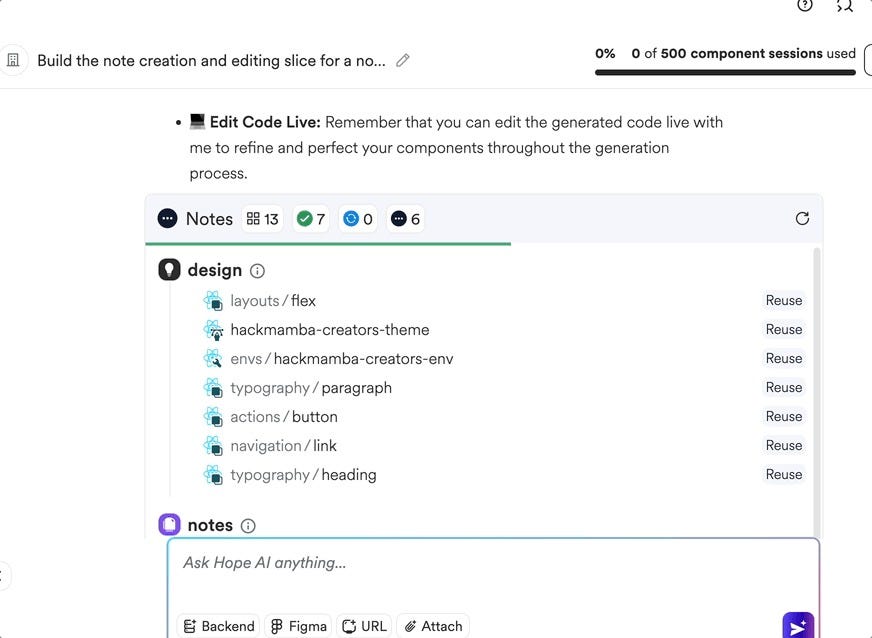
Once you enter this prompt, Hope AI, Bit Cloud’s reasoning layer, generates a proposed structure expressed through components and hooks rather than a finished application. This is the point where you pause to review boundaries, state ownership and assumptions before moving on. Treating the first output as an architecture review keeps decisions explicit and prevents rework later.
Press enter or click to view image in full sizeApplication strucuture generated by Bit Cloud
How to evaluate the first output before refining
At this point, you’re looking at a proposed structure. The first output shows how Bit Cloud understands what you want and how it plans to split it into components before writing any code. Think of this step as an architecture review focused on component boundaries. Each part you see shows a specific responsibility and gives you a chance to adjust the scope before any code is generated.
A practical way to evaluate the output is to look for three markers:
- Component granularity: The structure should split the task into clear parts, each with its own job. You should see separate pieces like a note list, note editor, markdown editor, layout components or utilities, not one big component that handles everything.
- Asset reuse: If your workspace already includes shared components or layout primitives, the structure should reflect that. A strong plan reuses existing building blocks instead of introducing new ones unnecessarily. This is a good signal that the output will integrate cleanly with the rest of your system.
- Logical flow: The relationships between units should make sense at a glance. You should be able to follow how data is expected to flow from persistence to state to the UI based solely on the structure. If the flow feels indirect or confusing, that is a sign to refine the structure before moving forward.
If these markers are present, the structure is ready for the next step. Once you approve it, Bit Cloud starts generating code, tests and documentation. Since you reviewed the structure first, the output is much less likely to need big changes later.
Why this model holds up in real projects
In real projects, features rarely exist in isolation. They have to fit into existing standards, shared components and team conventions. By surfacing structure before implementation, Bit Cloud makes those constraints visible early, when they are still easy to align on. Decisions about boundaries and reuse are made deliberately rather than inherited from a generated prototype.
Press enter or click to view image in full sizeA note taking app built with Bit Cloud
That early focus on structure directly affects reuse. Components that start out separate are easier to use in other parts of the system. For example, a markdown editor or list component can be reused elsewhere without bringing along extra layout or state. Over time, this means you build up useful parts instead of having to replace them again and again.
The same structure also supports handoff. When responsibilities are clear and components are shaped around intent rather than screens, another engineer can pick up the work without reverse-engineering a finished application. Work is easier to transfer because decisions are encoded in structure, not buried in implementation details.
The result is a workflow that favors early clarity over early polish. Progress is measured by how confidently structure can be reviewed and reused, not by how quickly a UI appears. That is why this model tends to hold up once software moves beyond a demo and into shared ownership.
Wrapping up
The difference between a quick prototype and a project that holds up over time often comes down to how early architectural decisions are made. Many AI tools focus on speed by giving you a full UI right away, which seems productive until a small change reveals tightly connected logic and hidden assumptions.
Bit Cloud focuses on structure before assembly, so boundaries and responsibilities are visible while they are still easy to change. That makes the output easier to review, evolve and hand off as a project grows.
Next time you use Bit Cloud, prompt for one well-defined slice and review the structure before generating code.