Image Upscaler – Upscale Your Photo for Free with AI
Good visuals make a strong first impression. Whether you’re creating a social media post, ad, or product listing, high-quality images help your brand look professional and trustworthy. But not every photo starts out perfect. That’s where image enhancement tools come in.
These tools use advanced technology, including AI, to make pictures clearer, sharper, and more detailed—without needing design skills. Below are five easy-to-use tools that can help improve the quality of your images for any marketing project.
1. ImageUpscaler – Best for Making Blurry Photos Clear
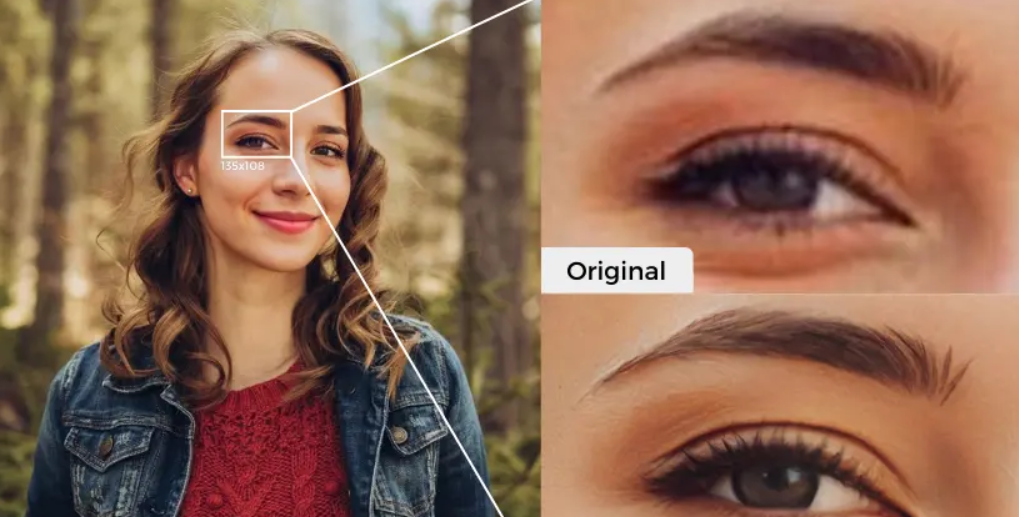
If you need to unblur image files without losing detail, ImageUpscaler is a top choice. This tool uses smart AI to sharpen low-quality photos and increase their size while keeping them clear.
What makes it great:
- You don’t need to install anything.
- It works online in just a few clicks.
- Perfect for turning small or blurry product images into sharp visuals for your website or ads.
It’s a time-saver for marketers who need clean, professional-looking images fast.
2. Pixelixe – Great for Quick Designs
Pixelixe is a design and editing tool that’s easy to use, even if you’re not a graphic designer. It helps you adjust and clean up images for online use.
Why marketers like it:
- Easy to add branding elements like logos or text.
- Useful for editing photos and creating ad banners.
- Ideal for social media, emails, and blog graphics.
It’s also good for teams that need to keep a consistent image style across platforms.
Key benefits:
- Removes blur from faces, objects, or text.
- Enlarges images without making them look pixelated.
- Great for eCommerce, digital ads, or profile photos.
It’s especially useful when you have only one version of a photo and need it to look its best.
4. Affinity Photo – A One-Time Purchase Option
Affinity Photo is a professional photo editing tool that offers advanced features similar to Photoshop but for a one-time cost. It’s packed with tools to clean up photos, reduce noise, and boost colors.
Good for:
- Businesses that need detailed editing for product catalogs or printed material.
- Anyone who wants more control without ongoing fees.
- Producing clean, high-resolution images from scratch.
It’s ideal for small agencies or teams who need pro-level quality.
5. Snapseed – Handy for Mobile Editing
Snapseed is a free photo editing app created by Google. It works on mobile devices and includes many tools to quickly improve your pictures.
Best features:
- Simple filters for quick adjustments.
- Tools to reduce noise and correct lighting.
- Great for editing photos on-the-go.
If you take photos with your phone for social media, this app can clean them up in seconds.
Why Good Image Quality Matters in Marketing
A clear image can grab attention faster than a block of text. Whether you’re promoting a sale, showing off a product, or posting an update, the right photo can make all the difference.
High-quality images:
- Build trust with your audience
- Encourage more clicks and conversions
- Make your brand look more polished and professional
Low-quality photos can hurt your brand image. But with these tools, you can avoid that risk—even if you’re working with older or lower-quality images.
To conclude:
You don’t need to be a graphic designer to create stunning visuals for your marketing materials. With tools like ImageUpscaler, Pixelixe, and AI image enlarger, anyone can turn simple photos into clear, engaging images.
Try one (or a few) of these tools and start upgrading the look of your brand today. Better images mean better engagement—and better results.
Source link