Build an AI app for chat and messaging | by Oluwadamilola Oshungboye | Apr, 2026
Meta: Build an AI chat app from prompt to production with Hope AI architecture and BitCloud’s testing, versioning and reusable components.
When you build software with AI, you need a clear path from a prompt to an application that can grow, adapt and support real work. Many AI builders focus on fast code generation, but you need more than that.
With Bit Cloud, the process does not start with code. It begins with Hope AI generating an architectural draft that defines system layers, component scopes and integration boundaries. From there, Bit Cloud provides the production environment where those components are tested, versioned, reviewed and reused as the application evolves.
In this walkthrough, you will see how that workflow comes together as you build a chat and messaging application. You will start with a natural language prompt, watch the system generate the architecture and components and then move into Bit Cloud, where the project becomes maintainable and ready for team development.
By the end, you will understand what it looks like to build an AI-assisted application from idea to a production-grade foundation your team can extend.
Prerequisites
Before starting this walkthrough, make sure you have:
- A Bit Cloud account to follow along with the component workflow
- Basic familiarity with React
- Working knowledge of TypeScript
Planning the app with Hope AI
The workflow begins inside Hope AI with the architecture, not code. This is a deliberate design choice. By starting with architecture rather than implementation, Hope AI ensures that what gets generated next is durable, extensible and suitable for long-term maintenance, rather than a brittle block of one-off code.
You start by describing the application you want to build in natural language. Hope AI works best when you treat the initial prompt like a conversation with another engineer. The more clearly you outline the users, flows, constraints and future requirements, the better the generated architecture will be.
A strong first prompt for this chat application explains who will use the app, which messaging flows matter, which platforms you plan to support and which AI capabilities you want to introduce over time. It also includes the technical constraints that define how the system should be structured, such as keeping the backend pluggable and ensuring the AI logic remains separate from UI and storage.
Here is the prompt used for this project:
“We need an internal web chat app for our product and support teams.
Users:
— Employees and support agents (logged-in users)
— Admins who manage channels and permissions
Core flows:
— One-to-one and small group messaging
— Message history with search and filters
— Optional AI help: summarize a conversation, suggest a reply, tag messages by topic
— Basic presence (who is online, typing indicators)
Platforms:
— Web app first (desktop + responsive mobile)
AI capabilities:
— Use AI blocks for: summarizing conversation threads, generating draft replies, tagging messages
— Keep AI logic separate from UI and storage so we can change models later
— Design clear provider interfaces (OpenAI, Anthropic, Gemini) that are easy to swap
Architecture requirements:
— Prefer using existing Bit.dev UI components from our design system
— Keep backend/storage abstract so we can plug in our own API (REST or GraphQL) and database later
— Use repository pattern with clean interfaces
— Organize code as reusable components and logic blocks that will live in BitCloud
Data and persistence:
— Start with MongoDB or PostgreSQL
— Design repository interfaces that support multiple backends
— Include proper data models for messages, channels, users, presence
“
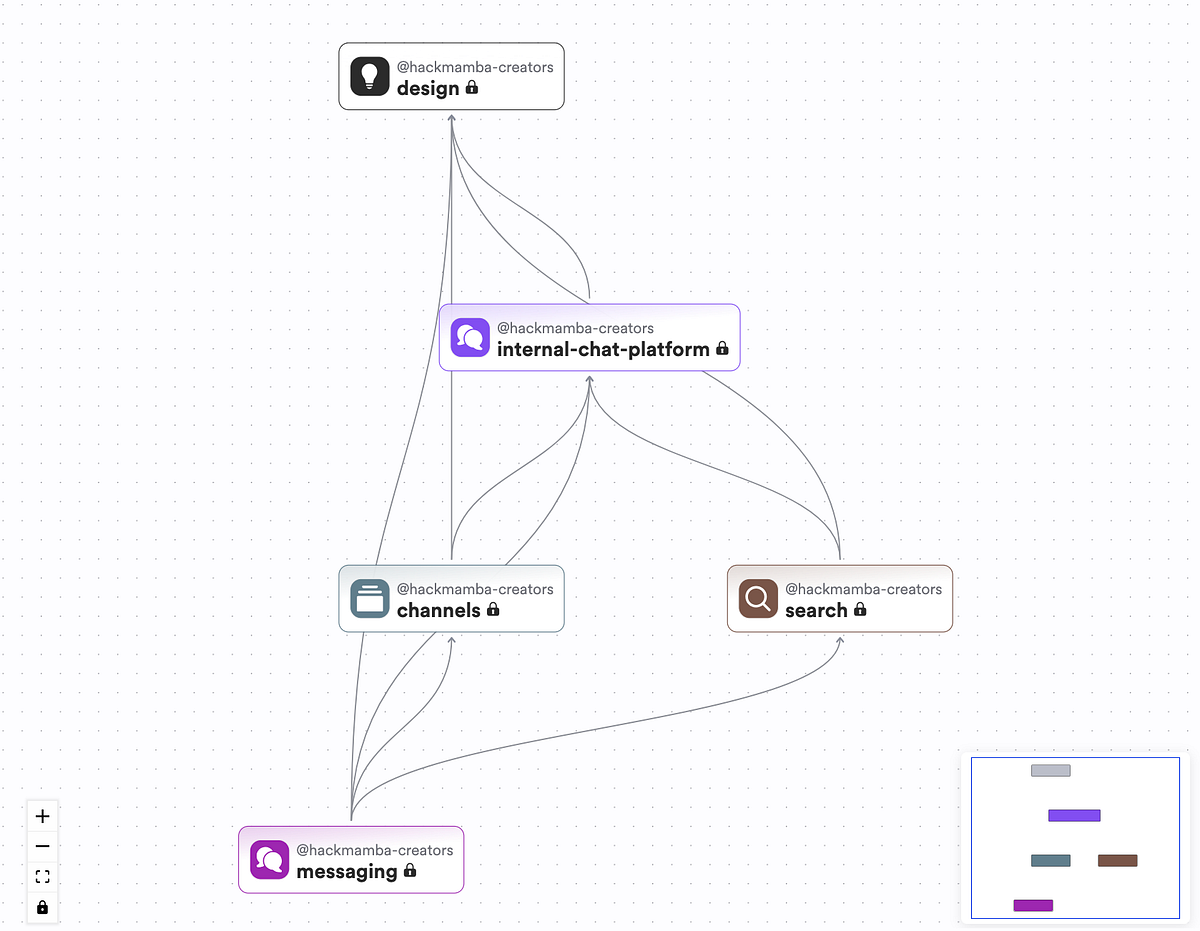
Once the prompt is submitted, Hope AI analyzes the requirements and returns an architectural proposal. This proposal identifies the major system layers, component scopes, the separation between UI and domain logic and the integration points for backend and AI providers. At this stage, Hope AI is still not generating code. It defines the system’s shape, so everything that follows is built on a stable foundation.
This architectural proposal directly maps to the component scopes you will see later, where each layer becomes a visible, versioned set of components that teams can explore and evolve.
Press enter or click to view image in full sizeHope AI Component Proposal
The architecture organizes the application into four distinct layers:
- A design system layer for reusable UI primitives
- An application layer for authentication, routing and core pages
- A messaging layer for chat-specific components
- A search layer that works across the application
Notably, Hope AI includes integration points for the AI provider, WebSocket layer and backend interfaces, but does not implement them. These remain open so you can connect them to your actual infrastructure.
Building the chat interface with Bit.dev components
Once you confirm the architecture, Hope AI generates a set of UI components and arranges them into scopes inside Bit Cloud. This is where the earlier architectural layers become concrete, versioned components.
Everything is organized into a clear hierarchy that separates design primitives, application layers and chat-specific features. This separation is what makes the system easier to explore, modify and extend as different parts of the app evolve independently.
Press enter or click to view image in full sizeScreenshot showing the bit.dev scopes
Design scope
The design scope contains reusable UI primitives such as Avatar, TextInput, Textarea, Spinner, Toast, Modal and Separator. These components come from your design system and can be used across any application, not only chat.
Internal-chat-platform scope
The internal-chat-platform scope includes core application components such as authentication providers, layouts, routing shells, user entities and shared utilities. This layer provides the structural foundation for the chat experience.
Messaging scope
The messaging scope holds chat-specific components such as channel lists, message lists, message bubbles, conversation headers, composers and search integration. These components build on the design primitives to form the actual messaging interface.
Search scope
The search scope contains components responsible for search flows, such as search inputs, result lists and filter helpers. These components remain reusable across the wider application.
Each component includes TypeScript source files, test files and documentation. Bit Cloud organizes them as standalone units with clear dependencies, making it easy to explore the generated structure at a glance.
Get Oluwadamilola Oshungboye’s stories in your inbox
Join Medium for free to get updates from this writer.
Remember me for faster sign in
Hope AI also wires the components together. The application routes load the chat dashboard, which imports the channel list from the messaging scope, which in turn uses cards and inputs from the design scope. The composer uses TextInput and Button. The message list uses Avatar and Timestamp helpers. Everything arrives connected in a predictable, modular hierarchy.
Most of the generated structure is ready to use as is. When needed, you can refine details such as props, spacing, typography and scroll behavior to match your product’s design system. For example, the message list includes default spacing and overflow rules that you can extend with timestamp formatting or read receipts, depending on your requirements. Here’s what the generated chat application looks like.
Press enter or click to view image in full sizeThe chat application
Designing the backend and storage layer
Once the UI and component structure are in place, the next step in the workflow is to decide how the application will store and retrieve data. Although Hope AI generates the frontend architecture and repository interfaces, it does not lock you into any specific backend implementation.
This is intentional, as every team has its own authentication provider, database preferences and messaging infrastructure, so the generated code leaves room for those decisions. This approach aligns with Bit Cloud’s open garden philosophy, which lets you retain full freedom to integrate with your existing stack rather than being forced into a single vendor or platform.
The generated frontend is built around a small set of core data operations. These include signing users in and out, retrieving the current user, loading channels and messages, sending new messages and handling presence updates. How these operations are implemented is entirely up to your stack and your infrastructure.
To support this flexibility, the scaffolding includes repository interfaces that define the data layer’s requirements. For example:
// Example: MessageRepository interface
export interface MessageRepository {
findById(id: string): Promise;
findByChannel(channelId: string): Promise;
save(message: Message): Promise;
delete(id: string): Promise;
}
Hope AI also provides mock implementations so you can build and test the frontend before the backend is ready. For example:
// Mock user data
export function mockUsers(): User[] {
return [
User.from({
id: ‘1’,
username: ‘samdoe’,
email: ‘sam.doe@example.com’,
status: ‘online’,
role: ‘admin’,
}),
// … more users
];
}
These mocks allow UI development to move forward without blocking on infrastructure work. When it is time to connect the real backend, you implement the repository interfaces using your preferred stack. You might rely on Auth0 for authentication, choose PostgreSQL instead of MongoDB or expose REST endpoints rather than GraphQL resolvers.
Because the generated architecture uses the repository pattern, none of these choices affect the UI or the domain logic. Components rely on stable interfaces, while your backend implementation remains fully under your control.
Integrating AI features into the chat flow
With the UI structure and backend interfaces in place, the final layer to integrate is the AI functionality. Hope AI prepares this step by generating the core logic blocks, function signatures and integration points for the AI capabilities you defined earlier. These include tasks like summarizing conversations, suggesting replies and tagging messages. These logic blocks live in their own isolated scope by design, so AI behavior remains independent from both the UI and the backend.
Rather than enforcing a specific provider, Hope AI creates clean, well-scoped interfaces that let you connect the model and provider of your choice. This separation is what makes the AI layer maintainable over time. You can refine prompts, switch providers or adjust behavior without changing UI components or backend code.
For the reply suggestion feature, Hope AI generates a function scaffold that looks like this:
export async function suggestReplies(
conversationHistory: Message[]
): Promise {
// Implementation goes here
}
The structure allows you to bring your own provider. You install the SDK for OpenAI, Anthropic, Gemini or any other model, then implement the function using your preferred prompts and patterns. Because these functions live in an isolated logic scope, you can iterate on prompts, switch models or refine behavior without touching UI components or data repositories.
Here is an example implementation using OpenAI:
import OpenAI from “openai”;
export async function suggestReplies(
conversationHistory: Message[]
): Promise {
const client = new OpenAI({ apiKey: process.env.OPENAI_API_KEY });
const context = conversationHistory
.slice(-5)
.map(m => `${m.sender}: ${m.text}`)
.join(“\n”);
const response = await client.responses.create({
model: “gpt-5”,
input: [
{
role: “system”,
content: “You generate short, helpful reply suggestions.”
},
{
role: “user”,
content: `Given this conversation:\n${context}\n\nSuggest 3 short replies.`
}
],
temperature: 0.7
});
const text = response.output_text.join(“”);
return text
.split(“\n”)
.map(r => r.trim())
.filter(Boolean)
.slice(0, 3);
}
UI components generated earlier already include hooks and event handlers that call these logic functions. When a user opens a conversation, the system retrieves the recent history and passes it to suggestReplies. When the user clicks a summary button, the UI calls summarizeConversation. You only need to implement the logic inside these functions.
This separation ensures that AI behavior remains flexible. Prompt tuning, provider switching and model upgrades happen in one place without rippling through the rest of the application.
Working with components in Bit Cloud
Once Hope AI has generated the components, the project needs a layer that can organize, test and manage those components as the code evolves. This is where Bit Cloud enters the workflow. Instead of navigating loose files across a single codebase, the chat application appears as a structured collection of independent components, each with its own code, documentation, tests and dependency graph. This is where teams review what Hope AI generated, understand how the pieces fit together and establish the governance needed before building new features.
Bit Cloud provides four key capabilities that make AI-generated code maintainable:
Component exploration
In the workspace, you can browse every generated component with complete visibility:
- View source code, documentation and usage examples
- See dependencies (what it imports) and dependents (what imports it)
- Examine authentication flow, messaging layer or AI blocks in isolation
- Navigate the component structure that reflects the architecture
Testing and quality control
Each component includes test scaffolds. Running bit test shows results across all components with coverage reports. Because each component builds independently, failures are contained and traceable. You can configure:
- Requirements for tests to pass before merging
- Coding standards that must be enforced
- Blocks on releases when dependencies have security issues
Independent versioning
Components track versions independently. When you update the User entity, you tag it as version 0.0.2. Other components specify which version they need, allowing updates without forcing changes across the entire system. Version history shows what changed, who changed it and which components were affected.
Cross-project reusability
Design system components such as Avatar, TextInput, Modal and Toast aren’t tied to the chat application. They exist in the design scope and can be imported into other projects:
- Use design components across applications
- Extend messaging components for future features
- Refine AI logic blocks without touching UI components
The workspace transforms generated code into a library of reusable, maintainable parts with clear ownership and quality control.
Building on the generated application
The real test of any AI-generated architecture comes on day two and beyond. This is when teams iterate, fix bugs, add features and adapt to changing requirements. The component-based structure makes ongoing maintenance straightforward. Teams can refine the UI, adjust AI behavior, add new features, update the backend infrastructure and onboard new developers without requiring architectural rewrites.
Refining the UI
Teams begin by improving the visual experience. Designers and developers adjust spacing, colors, typography and interaction patterns in components such as message lists, message bubbles and the composer. Since every visual element is an isolated component, updates stay contained and do not affect unrelated features. Each UI change can be tested and versioned independently.
Evolving AI features
As product needs evolve, so does the AI logic. Teams update prompts, adjust model behavior or switch providers. These changes remain inside the AI logic blocks that Hope AI generated. Because the AI layer is separate from UI and data layers, refining summarization prompts or swapping models does not require broader refactoring.
Adding new features
New features such as channel notifications, message reactions or role-based access control integrate cleanly with the existing structure. Developers create components within their respective scopes and reuse design primitives such as Toast, Modal and Avatar. The generated architecture supports incremental growth without rewrites.
Changing backend infrastructure
Backend and data model changes follow the same pattern of isolation. Migrating from mock repositories to PostgreSQL or switching from REST to GraphQL does not require frontend rewrites. Teams update repository implementations and the UI continues to function as expected. The repository pattern keeps the data layer flexible and shields the rest of the application from infrastructure changes.
Onboarding new developers
New team members can explore the workspace, review documentation and follow dependency graphs. Instead of digging through a large, unfamiliar codebase, they see a system broken into well-defined parts that reflect the architecture. This accelerates onboarding and reduces risk.
The generated scaffold becomes a team-ready application that supports iteration, collaboration, testing and long-term growth. All of these changes, from UI refinements to AI updates to backend swaps, work smoothly because they map back to the same component scopes and architectural boundaries defined at the start. This is the day-two value Bit Cloud is designed for, ensuring the system remains stable, understandable and adaptable as teams move towards long-term product development.
Wrapping up
This walkthrough showed what it looks like to build a real chat application with AI-assisted development. Hope AI provided the initial structure, turning plain language requirements into a clear architecture with well-defined components and logic blocks. Bit.dev provided the building blocks for the interface and Bit Cloud organized everything into a maintainable system that teams can test, review and expand.
What this workflow demonstrates is that AI is most valuable when it creates structure rather than shortcuts. By laying the application’s foundation and placing it in a component workspace, the system remains understandable as it grows. Teams retain full control over data models, backend integrations and product decisions, while the generated scaffolding provides a reliable starting point that does not collapse under real-world development.
If you want to try this workflow yourself, you can sign up on Bit Cloud and see how Hope AI turns your prompt into a production-grade application that can evolve with your team.